SOUTHWARE ANSWERS
  • AppCentral
  • SouthWare
  • Events
    • 2026 Aptean UNITE Conference Review
    • 2025 Aptean UNITE Conference Review
    • 2024 Aptean User Conference Review
    • 2023 Aptean User Conference Review
  • Resources
    • Today's Tip - Price Overrides
    • Genius Quick Tips
    • SouthWare Onboarding
    • StayCurrent
    • Solutions >
      • AvaTax by Avalara
      • EazyStock
      • Aptean CRM
      • Aris Power BI
      • SouthWare Manufacturing (BTM MMS)
      • OpusScan
      • StarShip
      • Warehouse Tracking
      • TaskWise
    • Webcast Videos
    • Year End Processing >
      • SouthWare Year-End Video
    • Service Status Pages
    • About & Contact

News

2018 w2 changes

10/30/2018

0 Comments

 
W2 Printed Forms
  • Two new Box 12 types GG Qualified Equity Grants Income and HH Aggregate Deferrals under Section 83i. This brings Box 12 codes to 29.

W2 EFW2 File:
  • RA record position 20-23 Software Vendor Code should be populated. SouthWare's vendor code is 1709.
  • GG and HH added to RO and RU records
  • GG amount in RO record positions 122-132 and the total GG amount in RU record positions 160-174
  • HH amount in RO record positions 133-143 and the total HH amount in RU record positions 175-189

These new changes require a CMSS expiration date of at least 10/31/18.

New programs are only required if submitting the EFW2 file or you need the two new BOX 12 types on the printed forms. 
0 Comments

rm export changed to be more consistent with csv standards

10/30/2018

0 Comments

 
When exporting a RM report to a CSV file, ReportMate will now add an extra " if a field contains a " to be more consistent with CSV standards.

For example if a field is: 21/2 " pipe
Output is  "21/2 "" pipe
0 Comments

SouthWare monitors released!

9/30/2018

0 Comments

 
Picture
SouthWare Monitors provide a powerful and convenient way for you to keep continual watch over the important aspects of your business. You can select any of the dozens of status counts or totals available for your SouthWare system and set benchmark values to monitor. At any time you can check which monitors need attention using your phone or computer, a vital feature to help focus your attention where it’s needed. ​

0 Comments

added xd, notes, and customer notes tabs to invoice detail view from customer detail view

9/6/2018

0 Comments

 
When looking at the Invoice Detail view from the Customer Detail view, you now have tabs to access Extended Data, Notes and Customer Notes related to the Invoice.
0 Comments

Flowpoints added to nloesub

8/23/2018

0 Comments

 
Two flowPoints have been added to NLOESUB to add fail logic; one for stock numbers and one for service codes.

The new flowpoints prevent a stock number or a service item being selected.

Program ID: NLOESUB
Flowpoint: 8701
DD File: ZF39
DD Field: 10
Primary File: IV01 (Stock Items)
Has Fail Logic: Yes, fail creates an error condition to prevent stock number from being entered.
CMSS Date: 08/31/18

​Program ID: NLOESUB
Flowpoint: 8702
DD File: ZF39
DD Field: 17
Primary File: SV01 (Service ids)
Has Fail Logic: Yes. fail creates an error condition to prevent service code from being entered.
CMSS Date: 08/31/18
0 Comments

flowpoints added to rsrecpst - posting receiving against customer ra

8/23/2018

0 Comments

 
0 Comments

New so maps in mobile tech portal

7/26/2018

0 Comments

 
Mobile Tech Portal: The directions link in the SO Tech View in the Mobile Tech Portal now opens Google Maps in a new window while passing the SO address. Google Maps defaults to the user's location as the starting point for the navigation.
If using a mobile device with the Google Maps app installed, navigation will open in the app instead of the browser.
0 Comments

task portal - Option to use saved filters

6/28/2018

0 Comments

 
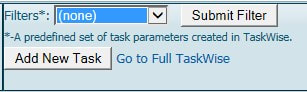
You now have the option to use Saved Filters in the Task Portal (TW-Tasks in the QuickScreens menu).  In the TaskWise Coordinator program (TW-01) for a task list you may create combinations of selection parameteres and save them as Filters.  You may then reuse those parameteres at any time by selecting that Saved Filter.

​In the Task List in the Task Portal you now have the option to select one of your Saved Filters and show the tasks applicable to that filter.  This appears in the upper right of the screen along with the “Add New Task” option previously available.
Picture
Please note that when you submit a filter that this ignores any date or search parameters in the left portion of the screen.  All parameters come from the Saved Filter.
0 Comments

New netlink debug mode

6/7/2018

0 Comments

 
A new debug option makes it easier to debug NetLink requests if a page is not working as intended. When you activate debug mode NetLink will insert related debug info directly within the source code of the resulting web page. This allows a NetLink developer to simply view the source code of a page to see info that can be helpful in debugging the NetLink request. 
netlink_debug_mode.pdf
File Size: 993 kb
File Type: pdf
Download File

0 Comments

New TaskWise Alert Manager Portal

5/31/2018

0 Comments

 
The new TaskWise Alert Manager portal includes the following enhancements:
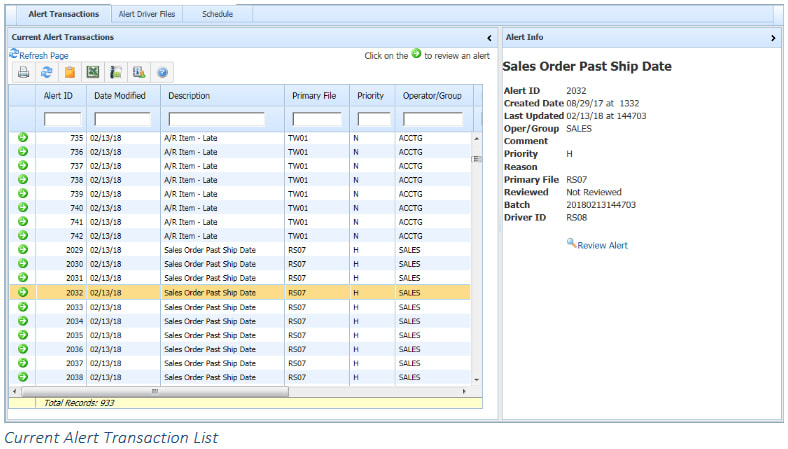
  • Quickly and efficiently review TaskWise alerts information
  • Access the Alert Portal including:
    • ​Alert Transactions
    • Alert Driver Files
    • Alert Schedules​
  • Alert Transactions Tab are based operator's security to see specific alerts
  • Please review the documentation for more information and details
Picture
0 Comments
<<Previous
Forward>>

    Archives

    November 2020
    September 2020
    August 2020
    July 2020
    March 2020
    December 2019
    November 2019
    October 2019
    August 2019
    June 2019
    May 2019
    January 2019
    December 2018
    November 2018
    October 2018
    September 2018
    August 2018
    July 2018
    June 2018
    May 2018
    April 2018
    November 2017
    August 2017
    June 2017
    May 2017
    February 2017

    Categories

    All
    Accounts Payable
    Enhancement
    Excel
    NetLink
    Portals
    Pricing
    Resource Management
    Southware
    SQLSync
    TaskWise

    RSS Feed

The SouthWare Partner Alliance (SPA) is the premier association of SouthWare Solution Partners - providing SouthWare Solutions, Technology, Training and Support Services. For more information about the SouthWare Partner Alliance or the Southware User Conference, please contact your SouthWare partner.
SouthWare Partner Alliance
© Copyright SouthwareAnswers.com. All Rights Reserved.  Privacy

Sign-Up for our E-mail list!

  • AppCentral
  • SouthWare
  • Events
    • 2026 Aptean UNITE Conference Review
    • 2025 Aptean UNITE Conference Review
    • 2024 Aptean User Conference Review
    • 2023 Aptean User Conference Review
  • Resources
    • Today's Tip - Price Overrides
    • Genius Quick Tips
    • SouthWare Onboarding
    • StayCurrent
    • Solutions >
      • AvaTax by Avalara
      • EazyStock
      • Aptean CRM
      • Aris Power BI
      • SouthWare Manufacturing (BTM MMS)
      • OpusScan
      • StarShip
      • Warehouse Tracking
      • TaskWise
    • Webcast Videos
    • Year End Processing >
      • SouthWare Year-End Video
    • Service Status Pages
    • About & Contact